There are many times when you'll want to add an internal sector that shares
a wall with its parent. Say you've made a long hallway, and now you want
to make it into a set of stairs. You should split the sector X amount
of times to create the stairs. To split a sector, you must insert, or use,
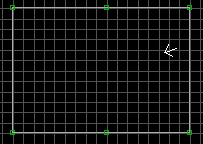
two vertices where you'd like to split the sector. Let's split our square
sector into two halves. We'd like to split it down the middle, but there
are no vertices on either the top or bottom white lines. Point the crosshair
at the middle of the top white line at hit the [Insert] key. Do the same
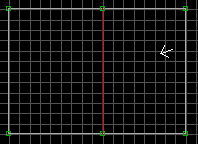
on the bottom white line. Point at either of the two newly created
vertices and hit the Spacebar. Point at the other vertice and hit the
Spacebar again. The sector is now split.
Creating an Island Sector
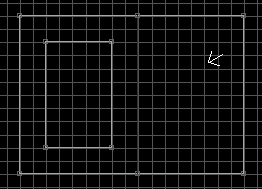
Let's make an island sector within the left half of our first square
sector. In 2d mode, point your cursor someplace inside the left sector. Press
the spacebar and start drawing a sector, just like you did in the first step.
Once you've got the four walls drawn, it should look like this:
If you switch to 3d mode, you'll see a big impassable block right in the
middle of your once clean room. By default, whenever you create a sector
completely within another sector, its walls are white, and non-player space.
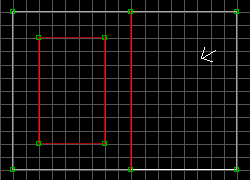
We want to make this into a little table, where Duke can jump up on it, and
see over it. To do this, the inner sector must be valid player space,
meaning all red lines. Make sure you're in 3d mode. Point your cursor inside
the inner sector, hold down [ALT], and hit [S].
Sector Sloping
Slopes are based on the Firstwall technique. There is one, and only one, wall of a
sector which is tagged as the Firstwall of a sector. This wall is used for floor/ceiling
texture alignment, as well as... sloping! The Firstwall is always the "pivot" point that
the ceiling and floor will slope from. Basically, the Firstwall is the only portion of
the slope that remains fixed, no matter how severe the slope is. You've probably noticed
this already.
The Firstwall is determined by, ironically enough, the very first wall that was drawn
when creating the sector. To change the Firstwall assignment, you can do it in two ways:
Change to 3d mode, point at the wall you wish to make the Firstwall, and hit ALT +F.
In 2d mode, move the cursor *inside* the sector to be modified, then move the cursor towards the
desired wall, until that wall starts flashing. Once it starts to flash, hit ALT +F.
You run into troubles whenever you modify the walls of an existing sector... ie add a
sector off one wall, split the sector in half, add an interior sector, etc. Once you do
this, Build makes what seems is a random selection as to the new Firstwall. All of your
sloping is now screwed up, as well. Simply follow the steps above



 , All Rights reserved.
 , All Rights reserved.