Earthquakes

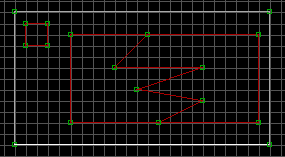
| Make one large sector, and place two island sectors within it. Make
one of the island sectors only a few units to a side. Make the other
nearly as large as the outer sector. Insert two vertices, one on both
the top and bottom lines of the inner, larger sector. Split that sector
and make some jagged edges, like the picture. This will be the sector our
earthquake will happen to.
|
|
|
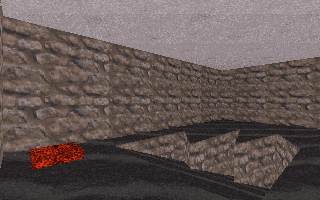
Switch over to 3d mode and change the floor slope of one of the jagged sectors
so that it drops below the floor height of the surrounding sector. You may
have to change the wall alignment of that sector by pointing at the "pivot"
wall and hitting ALT-F. This will cause the slope of that sector to start
from that particular wall.
|
|
|
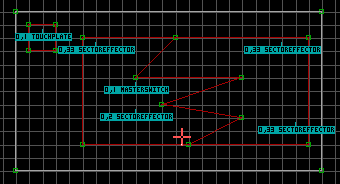
Insert a SE within the dropped-down sector. Change that SE lotag to
2. Insert a MASTERSWITCH sprite within that same sector. Change
the MASTERSWITCH lotag to 1, our unique earthquake number. Insert
a TOUCHPLATE sprite within the smaller island sector. The earthquake
will trigger when the player walks across this little sector. Change the
TOUCHPLATE lotag to 1 as well. Turn off gridlocking and move
both the SE-2 and MASTERSWITCH sprites close to the one of the jagged points,
but not outside the sector. Make sure the SE-2 and Masterswitch are on the
floor by hitting CTRL-PgDn on them. I've also put in three SE-33 sprites,
which are used to spawn little bits of rock when the earthquake occurs.
Switch to 3d mode and move them to the ceiling by hitting CTRL-PgUp.
|
 , All Rights reserved.